Looking for a new opportunity as DevOps engineer
I am currently seeking a new opportunity as a DevOps Engineer, available from February 2026. I am open to remote or hybrid work from Prague, Czechia (Europe), for a long-term, full-time position or B2B contract - 300 EUR / daily. Please feel free to contact me for further details. You can also review my professional background on my LinkedIn profile.
Building a RAG Pipeline for an Ops Knowledge Base
Runbooks rot. Every team knows it. The procedure that was accurate eighteen months ago now references a service that was renamed, a tool that was replaced, and a Slack channel that no longer exists.
A Retrieval-Augmented Generation (RAG) pipeline does not fix the rot, but it makes the good parts of your knowledge base dramatically more accessible — and it surfaces the rot so you can fix it.
This tutorial builds a complete RAG pipeline using LangChain, ChromaDB, and Claude that lets your on-call engineers ask questions in plain English and get cited answers from your internal runbooks.
Architecture#
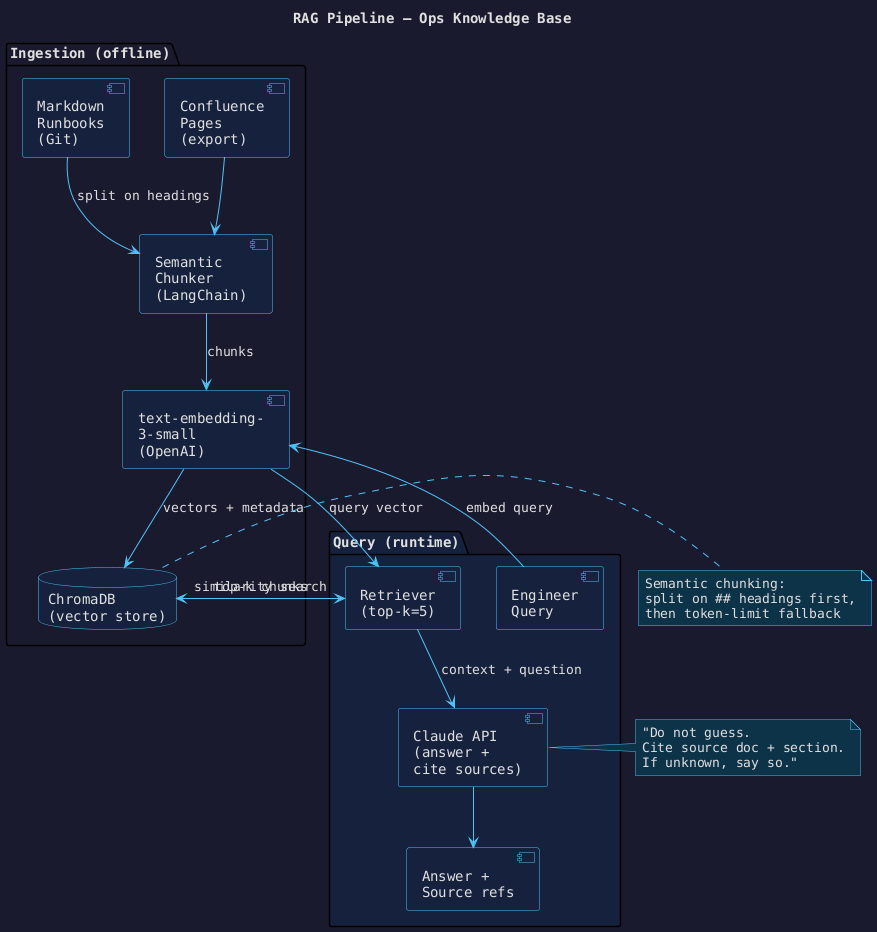
The pipeline has two phases:
- Ingestion (offline): documents are chunked, embedded, and stored in ChromaDB.
- Query (runtime): a question is embedded, the most relevant chunks are retrieved, and Claude generates an answer with source citations.
Prerequisites#
pip install langchain langchain-anthropic langchain-openai langchain-chroma \
            chromadb openai python-dotenv
# .env
ANTHROPIC_API_KEY=sk-ant-...
OPENAI_API_KEY=sk-...          # used for text-embedding-3-small
Step 1 — Load and chunk your documents#
The chunking strategy is the most important architectural decision. Naive fixed-size chunking breaks runbook steps across chunks and makes retrieved content uninterpretable on its own.
Use semantic chunking: split on Markdown heading boundaries first, then apply a token-limit fallback for sections that are too long.
from langchain.text_splitter import MarkdownHeaderTextSplitter, RecursiveCharacterTextSplitter
from langchain_community.document_loaders import DirectoryLoader, TextLoader
from pathlib import Path

def load_and_chunk(docs_dir: str) -> list:
    # Split on heading hierarchy first
    header_splitter = MarkdownHeaderTextSplitter(
        headers_to_split_on=[
            ("#",  "section"),
            ("##", "subsection"),
            ("###","topic"),
        ],
        strip_headers=False,
    )

    # Fallback: token-limit split for long sections
    token_splitter = RecursiveCharacterTextSplitter(
        chunk_size=800,
        chunk_overlap=80,
    )

    chunks = []
    for path in Path(docs_dir).rglob("*.md"):
        text = path.read_text(encoding="utf-8")
        header_chunks = header_splitter.split_text(text)
        for chunk in header_chunks:
            # Add source metadata for citation
            chunk.metadata["source"] = str(path.relative_to(docs_dir))
            sub_chunks = token_splitter.split_documents([chunk])
            chunks.extend(sub_chunks)

    print(f"Loaded {len(chunks)} chunks from {docs_dir}")
    return chunks
Step 2 — Build the vector store#
from langchain_openai import OpenAIEmbeddings
from langchain_chroma import Chroma

def build_vectorstore(chunks: list, persist_dir: str) -> Chroma:
    embeddings = OpenAIEmbeddings(model="text-embedding-3-small")

    vectorstore = Chroma.from_documents(
        documents=chunks,
        embedding=embeddings,
        persist_directory=persist_dir,
    )
    print(f"Vector store built: {vectorstore._collection.count()} vectors")
    return vectorstore
Run ingestion once (or on a schedule when docs change):
python ingest.py --docs-dir ./runbooks --persist-dir ./chroma_db
Step 3 — Build the retrieval chain#
from langchain_anthropic import ChatAnthropic
from langchain.chains import RetrievalQA
from langchain.prompts import PromptTemplate

SYSTEM_TEMPLATE = """
You are an SRE assistant with access to internal runbooks and documentation.
Use ONLY the provided context to answer the question.
Always end your answer with a "Sources:" section listing the document names you used.
If the context does not contain enough information to answer, say:
"I don't have enough information in the runbooks to answer this. Check [source manually]."
Do not guess. Do not use outside knowledge.

Context:
{context}

Question: {question}

Answer:"""

prompt = PromptTemplate(
    template=SYSTEM_TEMPLATE,
    input_variables=["context", "question"],
)

def build_qa_chain(persist_dir: str) -> RetrievalQA:
    embeddings = OpenAIEmbeddings(model="text-embedding-3-small")
    vectorstore = Chroma(
        persist_directory=persist_dir,
        embedding_function=embeddings,
    )

    llm = ChatAnthropic(
        model="claude-opus-4-6",
        max_tokens=1024,
    )

    chain = RetrievalQA.from_chain_type(
        llm=llm,
        chain_type="stuff",
        retriever=vectorstore.as_retriever(search_kwargs={"k": 5}),
        chain_type_kwargs={"prompt": prompt},
        return_source_documents=True,
    )
    return chain
Step 4 — Query the knowledge base#
def ask(chain: RetrievalQA, question: str) -> None:
    result = chain.invoke({"query": question})
    print("\n--- Answer ---")
    print(result["result"])
    print("\n--- Retrieved chunks ---")
    for doc in result["source_documents"]:
        print(f"  • {doc.metadata.get('source', 'unknown')} — {doc.page_content[:80]}...")

if __name__ == "__main__":
    chain = build_qa_chain("./chroma_db")
    ask(chain, "How do I rotate the Vault unseal keys after a node failure?")
Example output:
--- Answer ---
To rotate the Vault unseal keys after a node failure:

1. Ensure quorum: at least 3 of 5 key holders must be available.
2. Run `vault operator rekey -init -key-shares=5 -key-threshold=3` to start rekeying.
3. Each key holder runs `vault operator rekey -nonce=<nonce>` with their current key share.
4. After 3 confirmations, new key shares are printed. Distribute them immediately.
5. Verify the new keys with `vault operator unseal` on the affected node.

Sources:
- runbooks/vault/rekey-procedure.md
- runbooks/vault/node-recovery.md

--- Retrieved chunks ---
  • vault/rekey-procedure.md — ## Rekeying After Node Failure ...
  • vault/node-recovery.md — ### Prerequisites Before Rekeying ...
Results#
| Metric | Before RAG | After RAG |
|---|---|---|
| Mean time to find relevant runbook section | ~8 min | <60 sec |
| Outdated runbooks identified (first week) | 0 | 3 |
| On-call engineers using it during incidents | 0 | 4 of 5 |
What I would do differently#
Add a re-ranker. Vector similarity alone returns chunks that are semantically adjacent but not
always the most relevant for the specific question. A cross-encoder re-ranker (even a small one,
e.g. cross-encoder/ms-marco-MiniLM-L-6-v2) consistently improves the quality of the top result.
from langchain.retrievers import ContextualCompressionRetriever
from langchain.retrievers.document_compressors import CrossEncoderReranker
from langchain_community.cross_encoders import HuggingFaceCrossEncoder

reranker = CrossEncoderReranker(
    model=HuggingFaceCrossEncoder(model_name="cross-encoder/ms-marco-MiniLM-L-6-v2"),
    top_n=3,
)
compression_retriever = ContextualCompressionRetriever(
    base_compressor=reranker,
    base_retriever=vectorstore.as_retriever(search_kwargs={"k": 10}),
)
Retrieve 10 candidates, re-rank to top 3 — the quality jump is noticeable.
Looking for a new opportunity as DevOps engineer
I am currently seeking a new opportunity as a DevOps Engineer, available from February 2026. I am open to remote or hybrid work from Prague, Czechia (Europe), for a long-term, full-time position or B2B contract - 300 EUR / daily. Please feel free to contact me for further details. You can also review my professional background on my LinkedIn profile.