Looking for a new opportunity as DevOps engineer
I am currently seeking a new opportunity as a DevOps Engineer, available from February 2026. I am open to remote or hybrid work from Prague, Czechia (Europe), for a long-term, full-time position or B2B contract - 300 EUR / daily. Please feel free to contact me for further details. You can also review my professional background on my LinkedIn profile.
Disabling Auto Leveling on Creality Ender 3 S1 Pro with PrusaSlicer and OctoPrint
This tutorial provides step-by-step instructions to disable auto bed leveling (G29 commands) on the Creality Ender 3 S1 Pro when using PrusaSlicer with OctoPrint integration. Newer versions of PrusaSlicer automatically insert G29 commands into the start G-code for printers with bed leveling capabilities, which can cause unwanted auto leveling cycles during prints. By switching to Expert mode and editing the Custom G-code in printer settings, you can remove these commands entirely while maintaining compatibility with OctoPrint for seamless print uploads and monitoring.
Step 1: Switch to Expert Mode in PrusaSlicer#
PrusaSlicer’s Simple/Advanced modes hide advanced settings like Custom G-code. Expert mode unlocks full printer customization without breaking physical printer profiles for OctoPrint.
- Open PrusaSlicer.
- Click the configuration mode dropdown (top-right, shows “Simple | Advanced | Expert”).
- Select Expert. This reveals all tabs and fields, including detailed printer settings.
Note: Changes in Expert mode apply globally unless saved to a custom preset. Always save profiles before/after edits.
Step 2: Access Printer Settings and Edit Custom G-code#
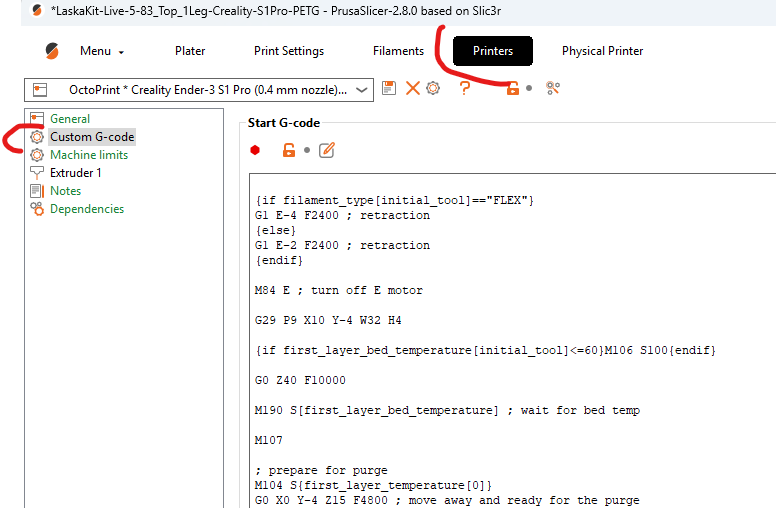
- In the Plater tab, click the Printer dropdown (gear icon next to “Printer”).
- Select Edit printer (or “Manage Printers” > Select your Ender 3 S1 Pro profile).
- Navigate to the Custom G-code section:
- Click Printer Settings tab.
- Scroll to Custom G-code (under Machine limits or Start G-code/End G-code subsections).
- Locate the Start G-code field. It contains the auto-inserted G29 block, typically after
MBL, resembling:
;
; MBL
;
M84 E ; turn off E motor
G29 P1 ; invalidate mbl & probe print area
G29 P1 X0 Y0 W50 H20 C ; probe near purge place
G29 P3.2 ; interpolate mbl probes
G29 P3.13 ; extrapolate mbl outside probe area
G29 A ; activate mbl
-
Remove the G29 section entirely:
-
Leave End G-code unchanged unless customized.
-
Click Save (or “Save as” for a new preset). Name it “Ender S1 Pro NoABL” to avoid overwriting stock profiles.
Looking for a new opportunity as DevOps engineer
I am currently seeking a new opportunity as a DevOps Engineer, available from February 2026. I am open to remote or hybrid work from Prague, Czechia (Europe), for a long-term, full-time position or B2B contract - 300 EUR / daily. Please feel free to contact me for further details. You can also review my professional background on my LinkedIn profile.