Looking for a new opportunity as DevOps engineer
I am currently seeking a new opportunity as a DevOps Engineer, available from February 2026. I am open to remote or hybrid work from Prague, Czechia (Europe), for a long-term, full-time position or B2B contract - 300 EUR / daily. Please feel free to contact me for further details. You can also review my professional background on my LinkedIn profile.
How I Integrated GitHub Copilot into Our DevOps Workflow
When I first pitched GitHub Copilot to my team at DHL IT Services, the reaction was polite scepticism. We were a DevOps team, not software developers — what would an AI code assistant do for people who mostly write Terraform, Bash, and YAML all day? Turns out: quite a lot.
This article is a practical guide to adopting Copilot in a DevOps context — what to set up, what to expect, and where the boundaries are.
How the workflow fits together#
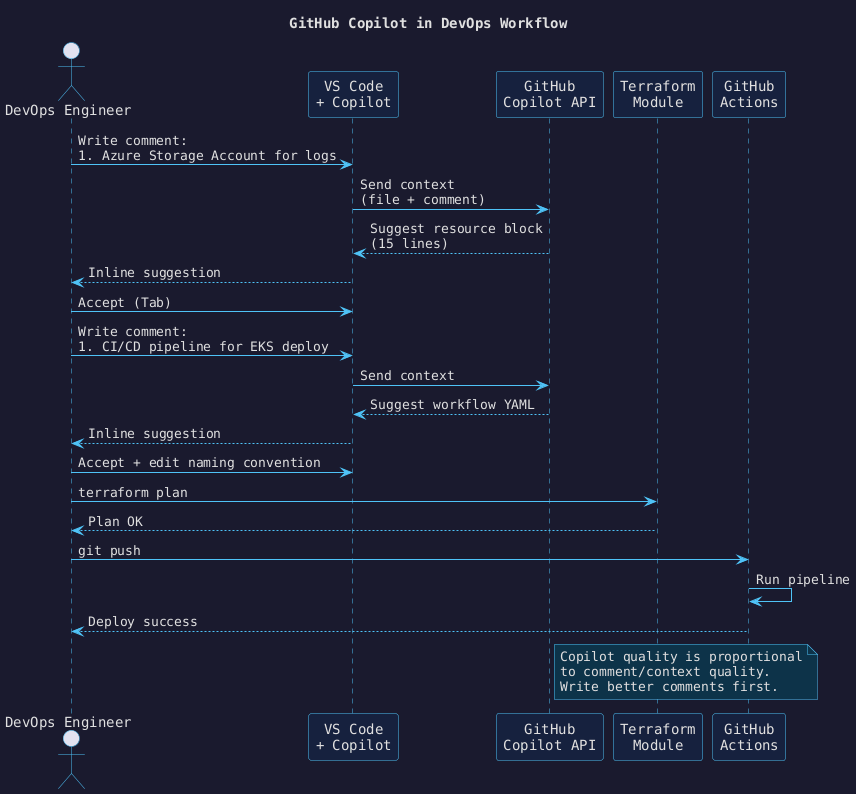
The diagram below shows the day-to-day loop: an engineer writes a comment, Copilot suggests a block,
the engineer reviews and accepts, then validates with terraform plan before pushing.
Prerequisites#
- VS Code with the GitHub Copilot extension installed and licensed
- Terraform CLI ≥ 1.5
- A
.github/copilot-instructions.mdin your repository (see below)
Step 1 — Write a Copilot instructions file#
This is the single highest-leverage thing you can do. Copilot reads .github/copilot-instructions.md
as additional context for every suggestion in the repository. Without it, suggestions will use generic
conventions that may conflict with your team’s standards.
# Copilot Instructions

## Terraform
- Use snake_case for all resource names.
- Always tag resources with: environment, owner, cost_center.
- Storage accounts: LRS redundancy, no public blob access, HTTPS only.
- Variable types must be explicit (string, number, bool — never `any`).

## GitHub Actions
- Use pinned SHA refs for third-party actions, never floating tags.
- Secrets via environment variables only — never hardcoded.
- Always add a `permissions:` block with minimum required scopes.

## Naming
- Resource groups: {env}-{region}-{workload}-rg
- Storage accounts: {env}{workload}sa (no hyphens, max 24 chars)
Step 2 — Write better comments before you write code#
Copilot quality is directly proportional to the quality of the surrounding context. A vague comment gets a vague suggestion. A precise comment describing intent, constraints, and naming gets a precise suggestion.
Weak:
# storage account
resource "azurerm_storage_account" "logs" {
Strong:
# Azure Storage Account for application logs.
# LRS redundancy, no public blob access, HTTPS only.
# Tagged: environment=prod, owner=platform-team, cost_center=infra-ops.
resource "azurerm_storage_account" "logs" {
  # Copilot suggestion fills the next 15 lines correctly
  name                     = "prodlogsasa"
  resource_group_name      = azurerm_resource_group.main.name
  location                 = azurerm_resource_group.main.location
  account_tier             = "Standard"
  account_replication_type = "LRS"
  min_tls_version          = "TLS1_2"
  enable_https_traffic_only = true

  blob_properties {
    delete_retention_policy {
      days = 7
    }
  }

  tags = {
    environment = "prod"
    owner       = "platform-team"
    cost_center = "infra-ops"
  }
}
Step 3 — Use Copilot for GitHub Actions YAML#
CI/CD pipeline YAML is an ideal target: highly structured, repetitive, and well-represented in Copilot’s training data. The pattern is the same — write a detailed comment block first.
# Deploy to EKS on push to main.
# Build Docker image, push to ECR, update the Helm release in the prod namespace.
# Requires: AWS_ACCESS_KEY_ID, AWS_SECRET_ACCESS_KEY, ECR_REGISTRY secrets.
name: Deploy to EKS

on:
  push:
    branches: [main]

permissions:
  id-token: write
  contents: read

jobs:
  deploy:
    runs-on: ubuntu-latest
    steps:
      - uses: actions/checkout@b4ffde65f46336ab88eb53be808477a3936bae11 # v4.1.1

      - name: Configure AWS credentials
        uses: aws-actions/configure-aws-credentials@e3dd6a429d7300a6a4c196c26e071d42e0343502 # v4.0.2
        with:
          aws-access-key-id: ${{ secrets.AWS_ACCESS_KEY_ID }}
          aws-secret-access-key: ${{ secrets.AWS_SECRET_ACCESS_KEY }}
          aws-region: eu-west-1

      - name: Login to ECR
        id: login-ecr
        uses: aws-actions/amazon-ecr-login@062b18b96a7aff071d4dc91bc00c4c1a7945b076 # v2.0.1

      - name: Build and push
        env:
          IMAGE_TAG: ${{ github.sha }}
        run: |
          docker build -t ${{ steps.login-ecr.outputs.registry }}/my-app:$IMAGE_TAG .
          docker push ${{ steps.login-ecr.outputs.registry }}/my-app:$IMAGE_TAG

      - name: Helm upgrade
        run: |
          helm upgrade --install my-app ./helm/my-app \
            --namespace prod \
            --set image.tag=${{ github.sha }}
Adoption phases#
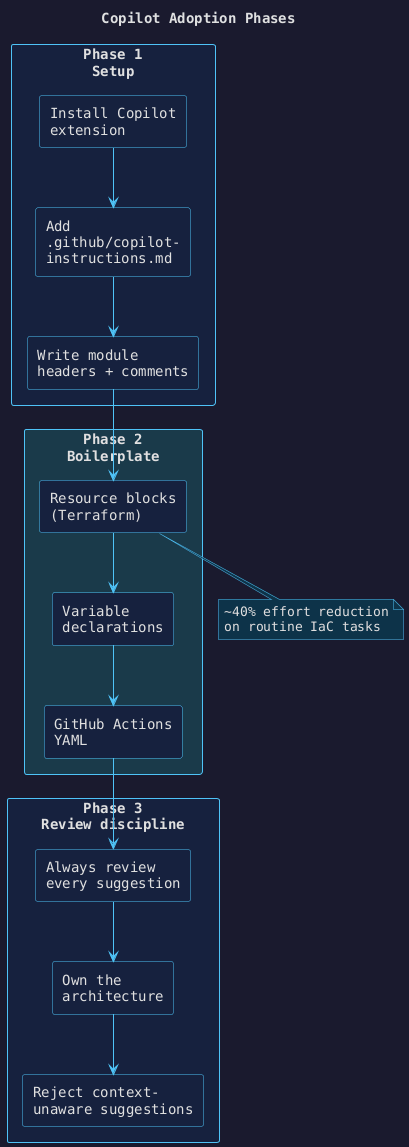
The diagram below maps the three phases of Copilot adoption for a DevOps team:
Results after three months at DHL IT Services#
| Metric | Before | After |
|---|---|---|
| Time to write a new Terraform module | ~2 hours | ~45 min |
| IaC PR review cycles (avg) | 3.2 | 2.1 |
| Manual scripting effort (routine tasks) | baseline | −40 % |
| Junior onboarding to conventions | 2–3 weeks | ~1 week |
What Copilot is not good at#
- Your infrastructure’s context. It does not know your subnet ranges, naming policies, or that a module you wrote six months ago already solves the problem.
- Correctness by default. Every suggestion needs review. The win is speed, not zero-defect output.
- State-aware reasoning. It cannot reason about what Terraform has already deployed.
Always diff the suggestion against your requirements. The 40 % effort reduction comes from accepting good suggestions quickly — not from skipping review.
Looking for a new opportunity as DevOps engineer
I am currently seeking a new opportunity as a DevOps Engineer, available from February 2026. I am open to remote or hybrid work from Prague, Czechia (Europe), for a long-term, full-time position or B2B contract - 300 EUR / daily. Please feel free to contact me for further details. You can also review my professional background on my LinkedIn profile.